
~/services/web-systems
A web system with sign-in and data, built to last.
I start by planning what the first version needs. Then I build it in parts, with tests, and hand over the code and accounts in your name.
A prototype is not a system
What impresses in a demo has to hold up day to day, with many people and real data.
Demo or spreadsheet
- One person uses it at a time
- Everyone sees everything
- Data scattered across spreadsheets and files
- Changes made straight in production
- Nobody knows what broke or when
A system built to last
- Many people at once, each with their own access
- Role-based permissions, checked on the server
- A database with rules and backups
- A test environment before every release
- Error logs and a history of what changed
What usually stalls a system that grew without a design
This is what I settle in the design, before writing the first screen.
- Critical
Access and permissions
Each person must see only what they are allowed to, and the server has to enforce it.
- Critical
Data model
Improvised tables that duplicate information and stall reports.
- High
Login and accounts
Sign-up, password recovery and invitations that must always work.
- High
Integrations
Payments, email and other tools that must talk without losing data.
- Medium
Tests
Without tests, every new screen risks breaking the ones that already work.
- Medium
Documentation
Whoever comes next must understand the system without depending on me.
How the system is put together
Four layers, each with one job. These are the tools I use; the final choice depends on the project.
Interface
The screens your team and your customers use, fast on phones and desktops.
- Next.js
- Astro
- React
- Tailwind CSS
API and business rules
Where the rules live: who can change what, and how.
- Hono
- Node.js
- TypeScript
- FastAPI
Data and permissions
The database, with access rules and backups.
- PostgreSQL
- Supabase
- Firebase
Deploys and operations
Test environment, automated deploys and error logs.
- Google Cloud
- Docker
- GitHub Actions
From design to a live system
Three phases. You approve the design before any line of code.
We define the work before development.
What this phase covers
- Screens and rules
- Data and permissions
I build and verify the work in parts.
What this phase covers
- Test environment
- Automated tests
You get instructions for operating the system.
What this phase covers
- Documented code
- Operating instructions
How it starts
You know what will be built, and in which parts, before you approve the build.
First conversation
Tell me what the system should handle.
- 30 minutes, at no cost.
You leave the conversation knowing the next step.
Design and scope
We define the first version.
- Screens and rules
- Data and permissions
We define the work before development.
Build in parts
You follow progress in a test environment.
- Test environment
- Automated tests
I build and verify the work in parts.
Launch and handover
I hand over the code, accounts and instructions.
- Documented code
- Operating instructions
You get instructions for operating the system.
What you get
- Signed-in area
- Admin panel
- Automated tests from the start
- Documented code
- Test environment
- Agreed launch plan
- Operating instructions
- Code and accounts in your name
See the potential before you invest
The design helps you understand what you will build before you invest in development.
Free first conversation
Tell me what you need to solve.
Scope before code
The first version has a defined scope.
You own the code
The handover includes the system accounts.
What the project excludes
- Out of scope
Native app
Apps for mobile app stores are outside the scope.
- Out of scope
Content production
You supply the product text and images.
- Out of scope
Daily operation
Your team operates the system after handover.
Cases
- Professional and client workConfidential
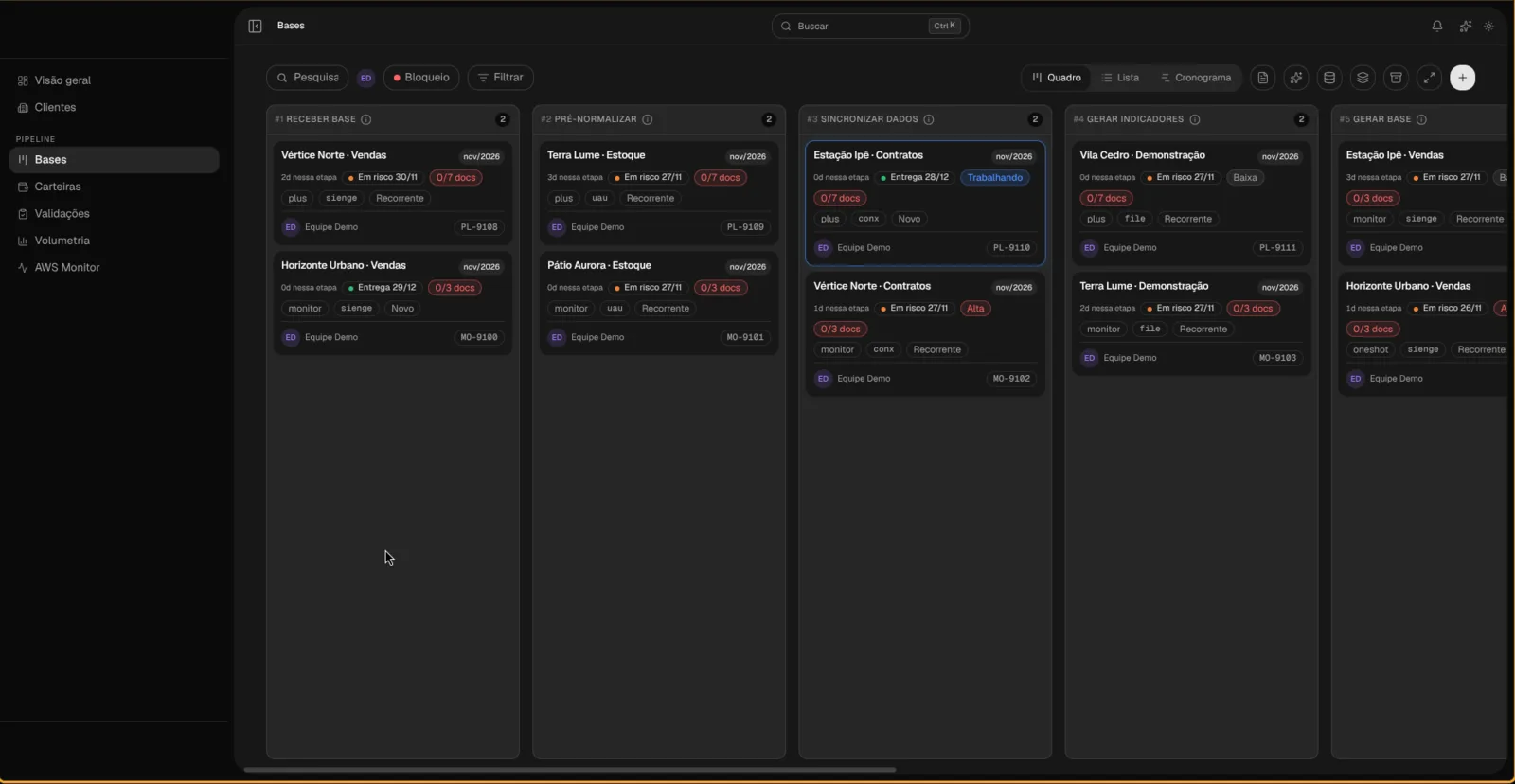
Data operations console
Internal Liquid AI product that became the source of truth for operations: the stage, owner, deadline and health of each client dataset sit in one place, for the team and for leadership. React 19 interface, Hono API, role-based access with Firebase and insights generated by Gemini.
- Professional and client work
Your Atelier Here
Platform for listing ateliers by geographic proximity, for people looking for an atelier near home and for those who today depend on a messaging group to be found. Distance search is the axis of navigation, not a secondary filter, because that is what decides the choice in this market.
Who handles the work
I lead the conversation and build the system. I use tests and code review to verify each delivery.
Agents in my workflow
- Claude Code
- Codex
- Grok
- Agy
- Cursor

If one of these sounds familiar, it is time to design the system
The spreadsheet became the company system and nobody can get a formula wrong.
The prototype won the client over, now it has to hold up under real use.
Each person should see only their own data.
Nobody wants to touch the code because nobody knows what will break.
I want the code and the accounts in my name, not locked to a vendor.
Frequently asked questions
How much should I define upfront?
Bring the problem. The design phase defines the first version.
Will I own the code?
Yes. The code and accounts are in your name.
Which details get set during design?
We define the first release, its screens, business rules and data.
Can we start small?
Yes. We can start with the workflow that most needs to move out of the spreadsheet.
Other services
Audit and repair for AI-built apps
Did your app start in an AI tool and turn fragile? I review the code and point out what can break or leak data. You decide whether to commission repairs.
AI, data and automation
Data pipelines and automations that clear repetitive work: spreadsheets that fill themselves, data that normalizes itself and routines that run alone.
AI governance
Rules, method and verification to use coding agents safely: what the AI may handle alone, what needs review and how to prove it works.
Websites, blogs and online stores
Your business website, landing page, blog or online store, fast on mobile, built to be found on Google or by AI agents, and with a direct way to reach you.
Next step
Ready to plan your web system?
In a free 30 minutes of conversation, tell me what your system should handle.