
~/services/ai-data-automation
Less manual work. More routines that run on their own.
I map today’s repetitive work, help choose the first routine worth automating, and deliver it running with real data, tests and instructions.
Tools I use
- Python
- Polars
- pandas
- FastAPI
- PostgreSQL
- Google Cloud
Manual routines don’t scale
While someone copies and checks by hand, errors and delays come along.
Manual routine
- Someone copies data from one tool to another
- Every file arrives in a different format
- Checks depend on whoever is on duty
- The report goes out when it can
- An error only shows up when someone complains
Automated routine
- The tools exchange data on their own
- Input is standardised before it moves on
- Validation rules stop bad data
- The report goes out on schedule
- An alert arrives when the routine fails
Where an automation usually goes wrong
This is what I check before the routine runs on its own.
- Critical
Input data
Files with swapped columns, broken accents and dates in different formats.
- Critical
Validation
Without checks, the automation spreads the error faster.
- High
Duplicates
The same row processed twice turns into a wrong charge or wrong stock.
- High
Silent failures
The routine stops and nobody notices until the report fails to arrive.
- Medium
Tool access
Integration passwords and keys stored carelessly.
- Medium
Regression tests
A change in the input format breaks what used to work.
From manual work to an automatic routine
The same task, before and after. Every automated step has its own check.
Today, by hand
- Download the files
- Copy into the spreadsheet
- Fix the formats
- Check row by row
- Build the report
Then, automatic
- Receive the files
- Standardise the data
- Validate the rules
- Write to the destination
- Send the report
From mapping to a routine that runs on its own
Three phases. The first routine goes live before anything grows.
We record inputs, outputs and checks.
What this phase covers
- Current workflow
- Scope of the first routine
I integrate the tools and verify the data.
What this phase covers
- Integrations
- Routine tests
You get instructions and know when to act.
What this phase covers
- Operating instructions
- Routine failure alerts
How it starts
You know which routine will be automated, and how it will be checked, before you approve.
First conversation
Show me the routine that takes the most time.
- 30 minutes, at no cost.
You leave the conversation knowing the next step.
Mapping
We review the workflow and its data sources.
- Current workflow
- Scope of the first routine
We record inputs, outputs and checks.
First routine
We verify the result with a controlled sample of real data.
- Integrations
- Routine tests
I integrate the tools and verify the data.
Delivery and follow-up
I deliver the routine with instructions and failure alerts.
- Operating instructions
- Routine failure alerts
You get instructions and know when to act.
What you get
- Integration between tools
- Data processing and normalization
- Automated reports
- Fewer manual errors
- Routine tests
- Instructions for automatic and manual steps
- Routine failure alerts
See the potential before you invest
Mapping helps you choose the first routine worth automating.
Free first conversation
Show me where work gets stuck.
Automation by routine
Mapping helps you choose where to start.
Data validation
Tests help find failures in the routine.
What the automation excludes
- Out of scope
Full data history
Cleaning the entire history at once is outside the scope.
- Out of scope
Licenses
You handle tool licenses.
- Out of scope
Decisions without review
AI decisions need human review.
Cases
- Professional and client workConfidential
Financial data normalization
Service that normalizes the heterogeneous financial data of the real estate developers served by Liquid AI, more than 20 active datasets. Each developer's rule enters as an adapter in a hexagonal architecture, not as a branch in the core. Cut the prep of a dataset from about five days to up to 30 minutes, protected by more than 4,800 test cases.
- Professional and client workConfidential
Data insights platform
Data analysis and transformation platform with generative AI, in paid production at Liquid AI. It brings AI into the analysis flow, instead of static dashboards that age with every business question, and separates orchestration from execution so the model is never the only path to trust the result.
- CLI, automation and Linux desktop
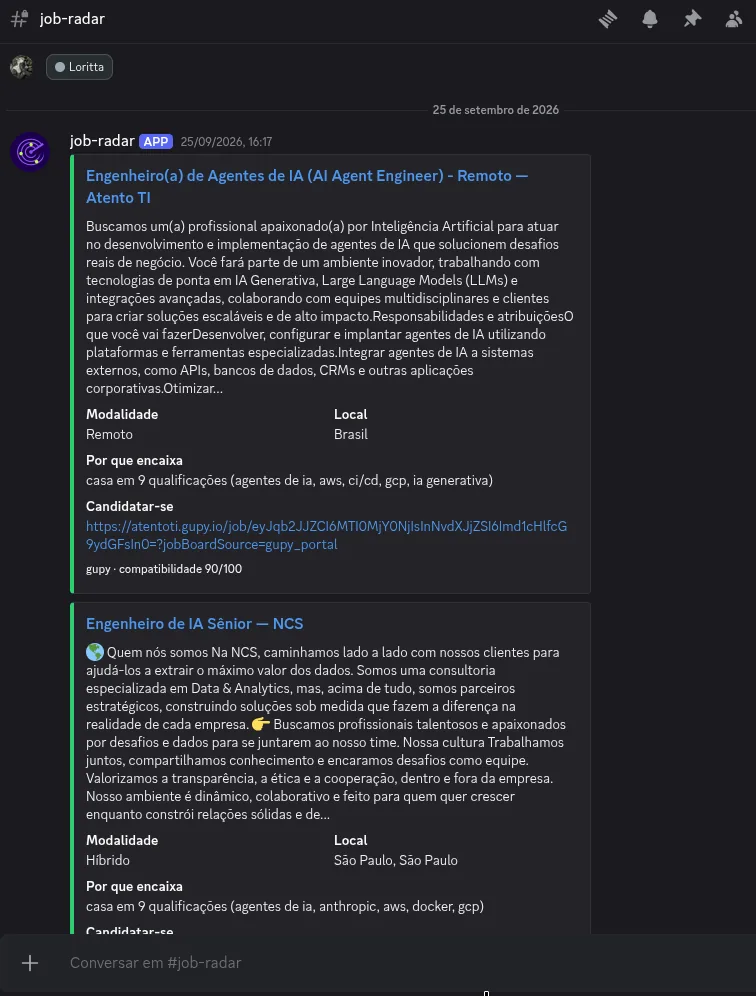
job-radar
Scrapes job boards, drops what does not match your profile and posts the matches to Discord, running on its own a few times a day. Pure Python, no dependencies: hard filters decide what gets through, a 0-to-100 score ranks the rest, and the qualifications come from your own resume in markdown.
Who handles the work
I follow the workflow from data sources to operating instructions. I verify inputs and outputs with tests.
Agents in my workflow
- Claude Code
- Codex
- Grok
- Agy
- Cursor

If one of these sounds familiar, it is time to automate
I spend the morning copying data from one spreadsheet to another.
Every client sends the file in a different format.
Monday’s report is only ready on Wednesday.
We have already paid dearly for a typo.
Only one person knows how to run this process.
Frequently asked questions
Will I need to replace my tools?
I start by mapping the tools you already use.
Can we start with one routine?
Yes. Mapping helps define that scope.
Which details get set during mapping?
We map the data, the tools involved and the first routine to automate.
How will I find out about failures?
The handover includes alerts if the routine fails and instructions for responding.
Other services
Audit and repair for AI-built apps
Did your app start in an AI tool and turn fragile? I review the code and point out what can break or leak data. You decide whether to commission repairs.
Web systems
A system with login, sign-up and securely stored data, built as a real product and not as a prototype.
AI governance
Rules, method and verification to use coding agents safely: what the AI may handle alone, what needs review and how to prove it works.
Websites, blogs and online stores
Your business website, landing page, blog or online store, fast on mobile, built to be found on Google or by AI agents, and with a direct way to reach you.
Next step
Which routine takes the most time?
In 30 minutes, at no cost, we discuss which routine is worth automating first.