CLI, automation and Linux desktop
AI Bar
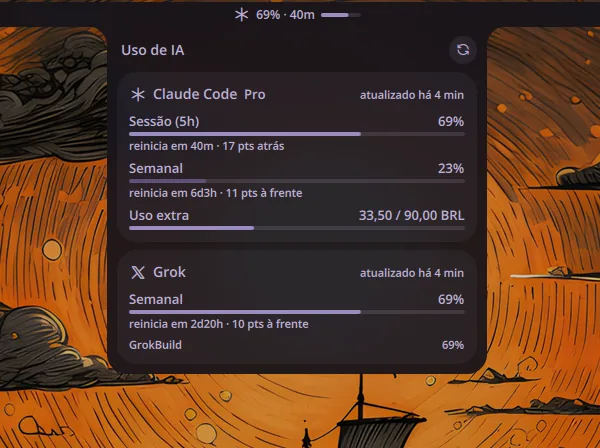
Plugin for Noctalia Shell that shows on the bar how much of the Claude Code and Grok plan has already been used: the percentage of the most critical window, the time until it resets, and a progress bar. In the panel, each window appears with the usage pace, ahead or behind relative to the time that has passed.
The problem
Knowing how much of the Claude Code and Grok usage plan was left required opening a page on each service, and the limit usually showed up only after it had already been blown, in the middle of work.
Technical decisions
A plugin of the shell itself, on the bar that is already in view, following the Daybar architecture: all logic in pure JavaScript functions tested with Vitest, and QML only as the screen. CLI credentials are only read, never written, copied or renewed, and the token goes only in the request header. A request that fails keeps the last good data marked as stale, instead of emptying the bar. Pace compares the percentage used with the percentage of time that has already passed in the window. Endpoints and gotchas came from ai-usagebar, by Fabio Akita, without reusing the code.
Outcome
Personal use on my desktop with CachyOS, published under the MIT license, with 36 tests. It warns once when a window goes past 97%. Tested on Noctalia 4.7.7; the port to Noctalia v5 is planned.
Images